
Telegram Member Adder Software: How to Grow Groups Safely
Learn what people mean by Telegram member adder software, how to grow Telegram audiences safely, and which TelePilot Pro tools fit member growth workflows.
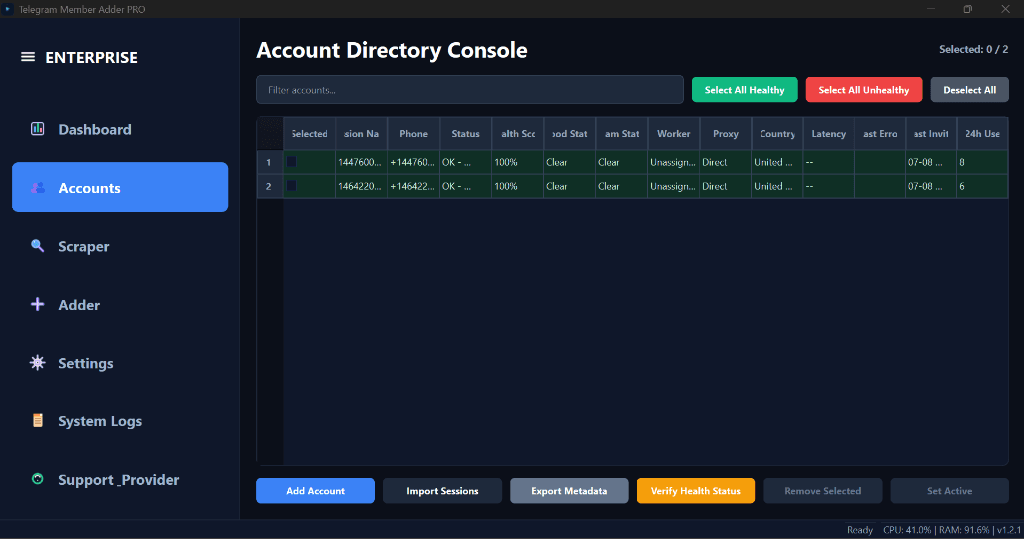
When marketers search for Telegram member adder software, they usually want one of three outcomes: more members in a group they manage, a cleaner list of people to contact, or a repeatable workflow for outreach. The phrase sounds aggressive, but the professional version of this work is careful audience building—not random adding or spam.
This guide explains what the term covers, how to stay within Telegram’s rules, and where each TelePilot Pro product fits. For a product-by-product overview, start on our Telegram member adder software page.
What “Member Adder” Usually Means
People use the same search phrase for different jobs:
- Group growth — inviting interested users into a community you administer.
- Audience research — exporting member lists from groups you can access for later segmentation.
- Outreach — sending direct messages to people who opted in or have a legitimate business relationship with you.
- Content distribution — forwarding announcements between channels and groups.
- Campaign visibility — posting structured promotional messages in groups where that is allowed.
- Conversion — turning attention into sales or support conversations inside Telegram.
Because these workflows touch real people, treat permission, relevance, and pacing as non-negotiable. Do not add strangers without consent, scrape private data for resale, or blast identical messages across cold lists.
TelePilot Pro Tools by Workflow
TelePilot Pro is a software catalog—not a single “adder” button. Match the product to the job:
| Workflow | Product | Best for |
|---|---|---|
| Full desktop marketing suite | TelePilot Pro Suite | Bulk messaging, scraping, channel sync, multi-account control |
| Controlled group invites | Telegram Member Adder PRO | Scraping members, CSV export, safe invite queues on Windows |
| Group campaign posting | Telegram Shill Bot PRO | Template-based posting with pacing and limits |
| Source-to-destination routing | Forward Bot PRO | Real-time forwarding with filters and delays |
| In-chat commerce | Universal Shop Bot PRO | Digital product delivery and checkout inside Telegram |
| Structured reporting workflows | Telegram Report PRO | Campaign-style reporting automation |
| Video asset prep | Bypass Video PRO | Batch video processing for campaign media |
Pricing for each product is listed on the pricing page. Plans are sold as monthly, yearly, or lifetime licenses depending on the product.
When to Start with TelePilot Pro Suite
Most teams that need a central operations desk begin with TelePilot Pro Suite. It is the broadest desktop tool in the catalog and covers account handling, outreach scheduling, public data workflows, spintax messaging, proxy rotation, and campaign monitoring.
Choose Suite when you need:
- Multi-account campaign control from one dashboard
- Bulk direct messaging with configurable delays
- Member scraping with activity filters
- Channel mirroring between sources and destinations
- A single license path before adding specialized tools
See the TelePilot Pro setup docs for installation and activation steps.
When to Use Telegram Member Adder PRO
If your primary goal is scraping members and inviting people into groups you administer, Telegram Member Adder PRO is the focused option. It runs on Windows and is built around:
- A scraper account plus separate adder worker accounts
- CSV export with source-session tracking
- Join-then-invite flows with per-account caps and cold-account limits
- Run reports saved locally after each invite session
Member Adder PRO is not a substitute for content strategy. It helps you execute invite workflows with structure and logs—not bypass Telegram’s limits entirely.
Supporting Tools for Growth Campaigns
Shill Bot PRO fits teams that need repeatable group visibility: templates, group lists, pacing, and campaign analytics. Use it when promotion inside communities is part of the plan—not when you only need private invites.
Forward Bot PRO fits content-led growth. If your channel publishes useful updates, forwarding (with filters, delays, and emoji replacements) distributes that value across satellite groups without manual reposting.
Universal Shop Bot PRO matters when growth should produce revenue: product catalogs, automated delivery, and checkout flows inside Telegram.
A Responsible Growth Workflow
- Define the audience and goal — community, leads, or sales; pick one primary outcome.
- Use compliant sources — groups you can access, opt-in lists, or cross-promotion partners.
- Prepare useful content — people stay when the group delivers value, not just pitches.
- Choose the right product — Suite for breadth; Member Adder PRO for invite queues; bots for posting or forwarding.
- Run with pacing — low volume first; increase only when accounts stay healthy.
- Review reports weekly — adjust targeting, copy, and timing from real results.
Common Mistakes to Avoid
- Inviting users who never expressed interest in your topic
- Running new accounts at full volume on day one
- Using one account and one IP for all activity
- Sending identical copy to hundreds of recipients
- Measuring success by member count alone instead of retention and replies
Bottom Line
“Telegram member adder software” describes a set of workflows, not a single tactic. Start with permission and relevance, then pick the TelePilot Pro tool that matches how you actually grow: Suite for full-stack marketing, Member Adder PRO for structured invites, or specialized bots for posting, forwarding, and commerce.
Compare plans on pricing, read product docs in the documentation hub, and build campaigns you would not be embarrassed to explain to a real user.
Ready to automate your Telegram marketing?
Try TelePilot Pro — 40+ tools in one powerful desktop application.
Get Started Today